Everything it does, and what it costs.
The whole product, in the order you meet it. Anything without a Pro beside it is free forever — that is most of this page.
A logger that gets out of the way
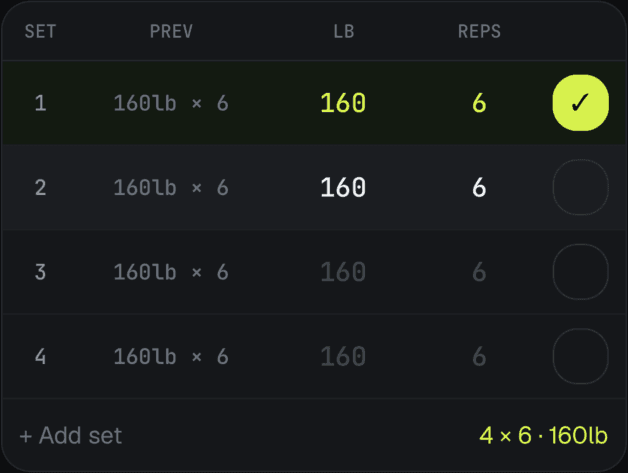
One exercise at a time, with the numbers already filled in. The fewer decisions between racking a set and logging it, the more sets actually get logged.
- Placeholders from your last session
- Every set opens showing the weight and reps you did last time, so logging an unchanged set is a single tap — the checkbox, or the Log button on the set bar.
- A rest timer that starts itself
- It runs the moment you check off a set. Set a default, override it for one exercise, or add time without leaving the set you're on.
- Warm-up and working sets
- Tap a set's number mid-workout to change its type. Warm-ups are kept out of your volume and your records.
- Drop sets and myorepsPro
- The other two types on that same menu — a drop set logged as one set with its drops, and myorep sets marked as what they are rather than logged as three ragged working sets.
- Supersets
- Group exercises into a superset in the builder. Mid-workout they are one stop, not two — log a set and the entry bar hands you the other exercise at the same round, and no rest timer fires until the round closes.
- Change the session while you're in it
- Add an exercise the workout did not plan for, skip a set, or skip the rest. Nothing you do mid-session has to be fixed up afterward.
- Bodyweight moves that know they are bodyweight
- Pull-ups and dips drop the weight field and take your added weight when you wear it — one exercise, not a separate weighted copy of it.
- Records caught as you lift
- A personal record is recognized on the set that sets it, not discovered in a chart days later.
Build it once, start it in a tap
Programs ready to go for the gym or for home, or build your own workouts, and an exercise library that tells you what to do instead when the rack is taken.
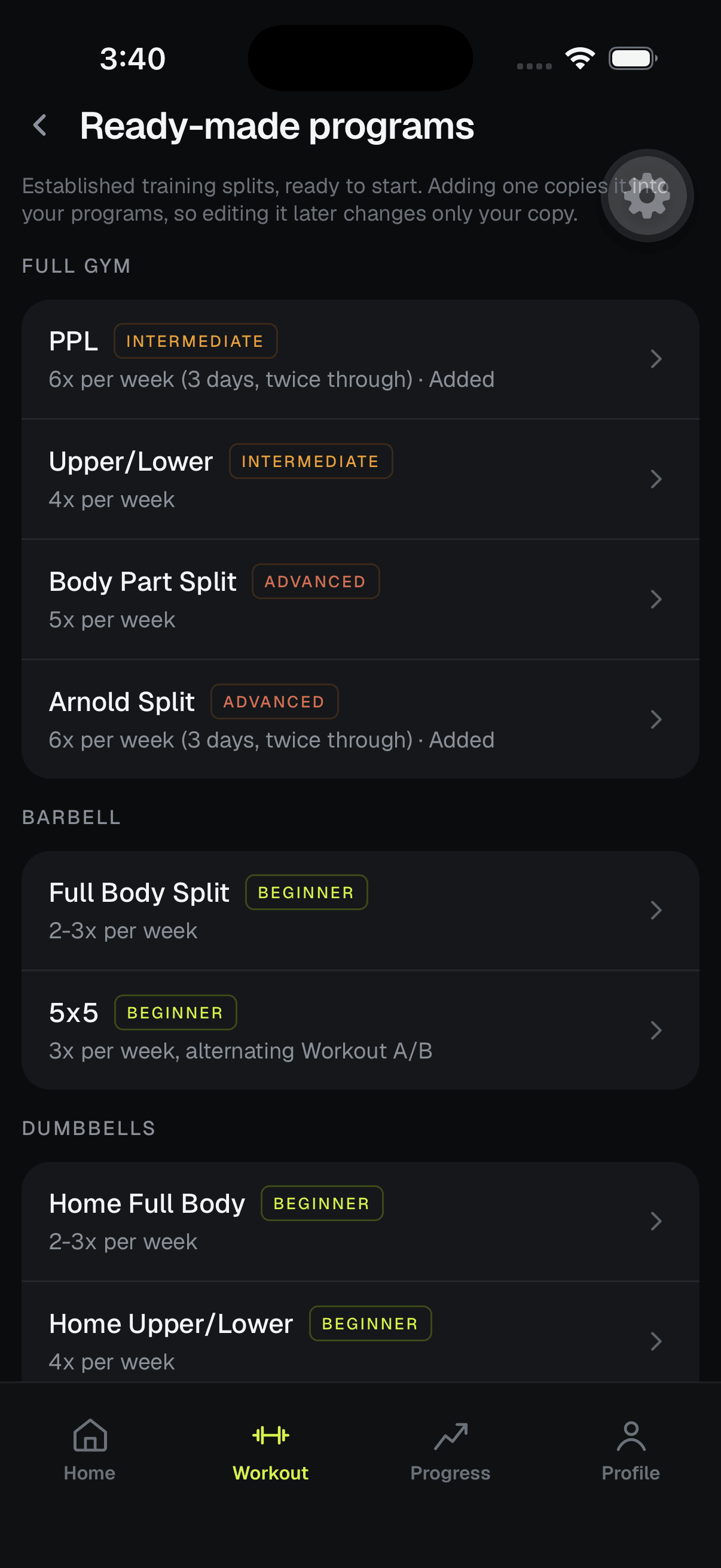
- Ready-made programs, grouped by the kit you have
- Full gym: PPL, Upper/Lower, Body Part Split and the Arnold Split. Barbell: Full Body Split and 5x5. Dumbbells: Home Full Body, Home Upper/Lower and Home Push/Pull/Legs. Kettlebell: Kettlebell Full Body. Bodyweight: At Home (no equipment) and Bodyweight Upper/Lower.
- A matched plan, and why it was matched
- Four answers in setup — goal, experience, days a week and equipment — and we propose a program and your training weekdays, and show the reasoning.
- A workout builder, drag to reorder
- Build a workout once and start it whenever you like. Per-exercise sets, target reps and target weight, with the session's estimated duration as you go.
- An exercise library you can search and filter
- By muscle and by equipment, with the muscles worked, the movement pattern and your own history on every exercise.
- Three ranked swaps on every exercise
- Ranked by muscle, movement pattern, equipment and difficulty — on every exercise page, and one tap away mid-workout when the rack you wanted is taken.
- Custom exercises
- If a lift isn't in the library, add it once and it's yours to reuse. Name it, give it a primary muscle and the ones that assist, pick its equipment, and say whether it carries weight — it then counts toward your volume and your muscle map like everything else.
- Duplicate, rename, set active
- Keep a deload variant beside the real thing. Programs are yours to fork, not a setting with one slot.
Every chart, free forever
Strength, volume, records, consistency and muscle coverage. Your own numbers are never the thing behind the paywall — reading them for you is.
- Estimated 1RM, per exercise
- Epley, trending over the range you pick, with the percentage change stated outright.
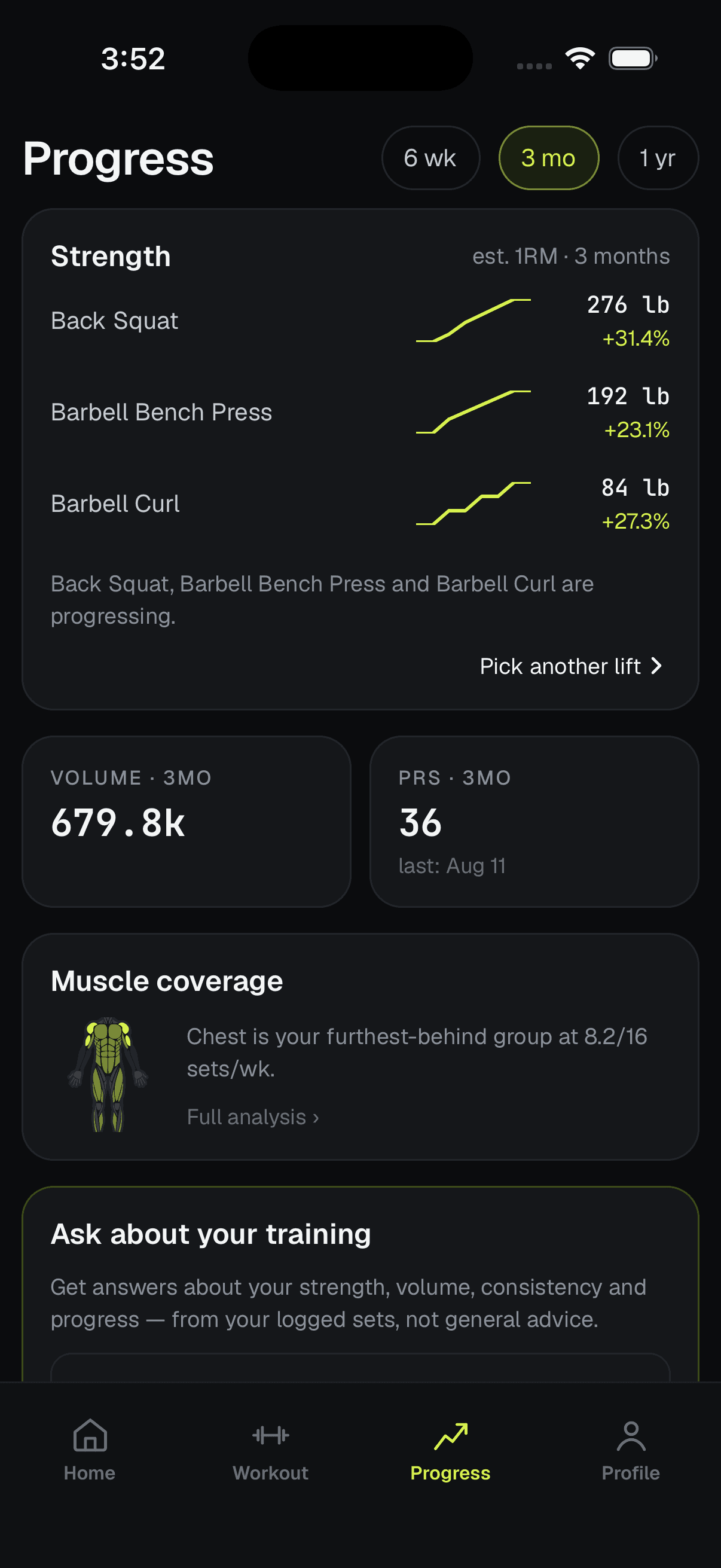
- Volume, against the period before it
- Weekly totals with the percentage change, and the same volume broken out by muscle group.
- Every personal record
- Tracked automatically and filterable by record type. Nothing to mark yourself.
- Your whole history, searchable
- Grouped by month, down to the individual set, and editable if you logged something wrong.
- A heatmap of every day you trained
- Plus a weekly grid of planned against completed. Tap any day to open that workout. No streaks to break.
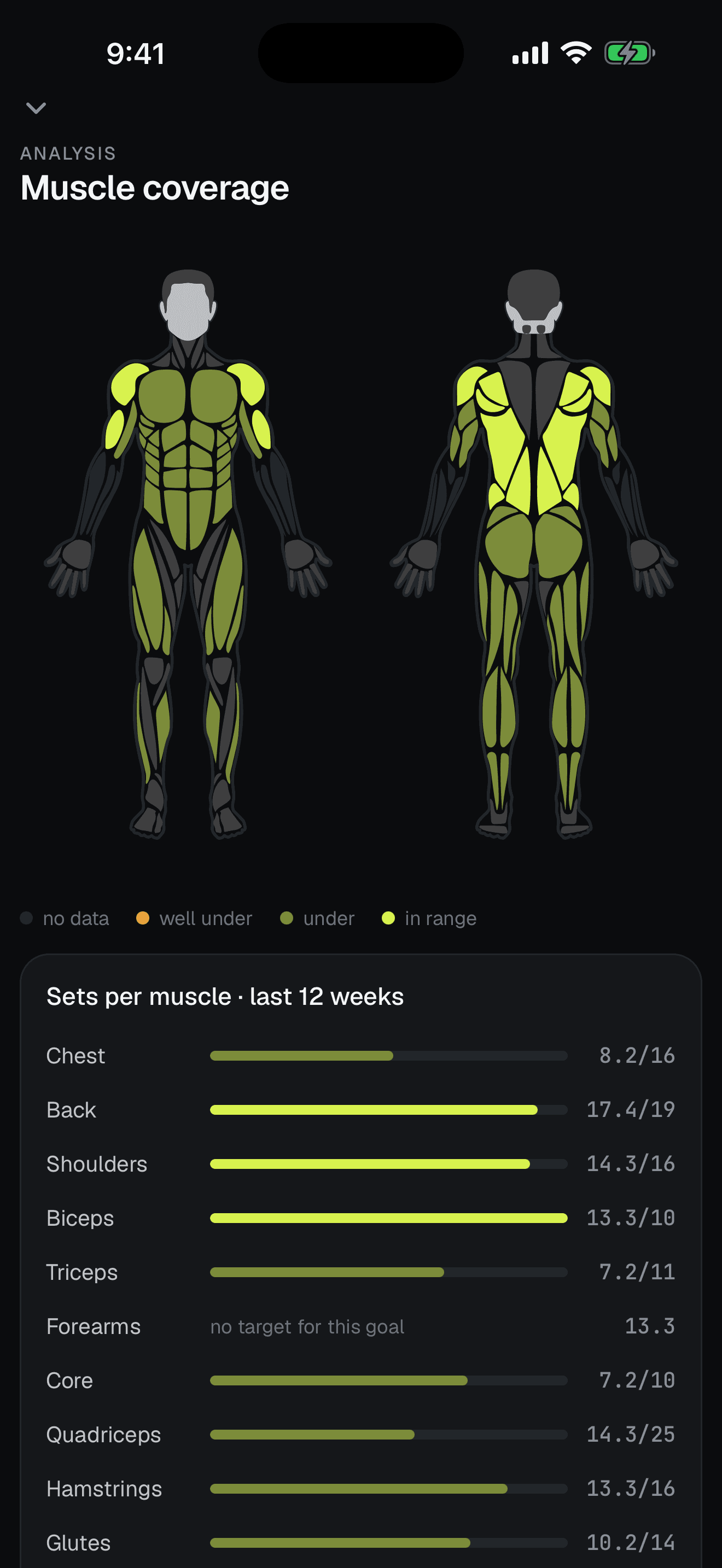
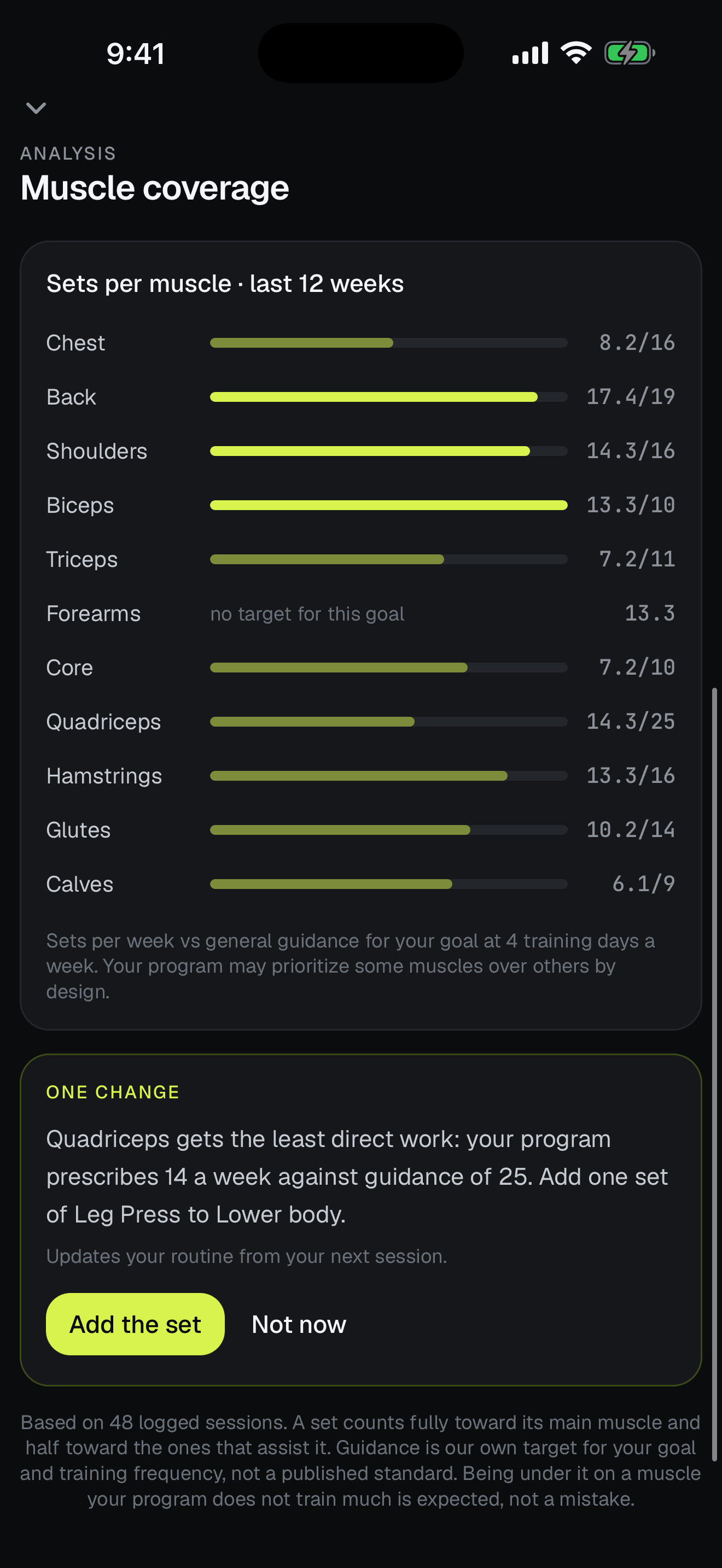
- A body map and weekly set counts
- A set counts fully toward its main muscle and half toward each muscle that assists it, so rows credit your biceps and presses credit your triceps. Targets follow your goal and how many days a week you train.
- What the map meansPro
- Which muscles get the least direct work on your program, and what would fix that.
- The fix, in one tapPro
- It picks the muscle, the exercise and the day, and edits the program itself. On most programs — a few, like 5x5 and the Arnold split, are deliberately left alone.
It reads your training, then changes the plan
Free gives you every number. Pro is the layer that reads them back — and the only part of RepPlanr that will change your plan rather than just describe it.
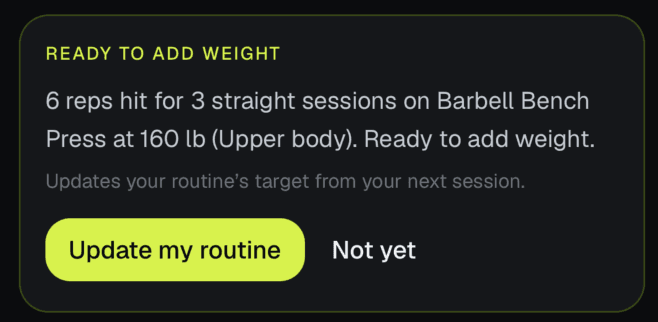
- Progression suggestions, on the liftPro
- They arrive on the exercise itself, mid-session, the session your logged sets say you're ready for one. Accept it and the workout's target moves up, so next time prefills heavier. It's arithmetic over your clean sessions, not a model's opinion.
- Ask about your own trainingPro
- Ask it anything and the answer is assembled from sets you actually logged. When there isn't enough there to say, it tells you that instead of inventing a number — and some answers carry a change you can apply on the spot.
- A weekly report that stays quietPro
- What changed, and which progressions you accepted. Each section has to differ from your own norm to appear, so a week that looked like every other week doesn't generate a page about it.
- A read on every finished sessionPro
- A short paragraph on the workout summary, about the workout you just did.
Yours, and portable
No account to start, no connection required, and a file you keep whatever happens to us.
- Offline-first, not offline-tolerant
- Logging, history and the rest timer work with no connection at all. Sync catches up when you're back. Only the Pro reading and report generation need a network.
- No account to start
- A private profile is created on your device. Add an email whenever you want and everything you've already logged comes with it.
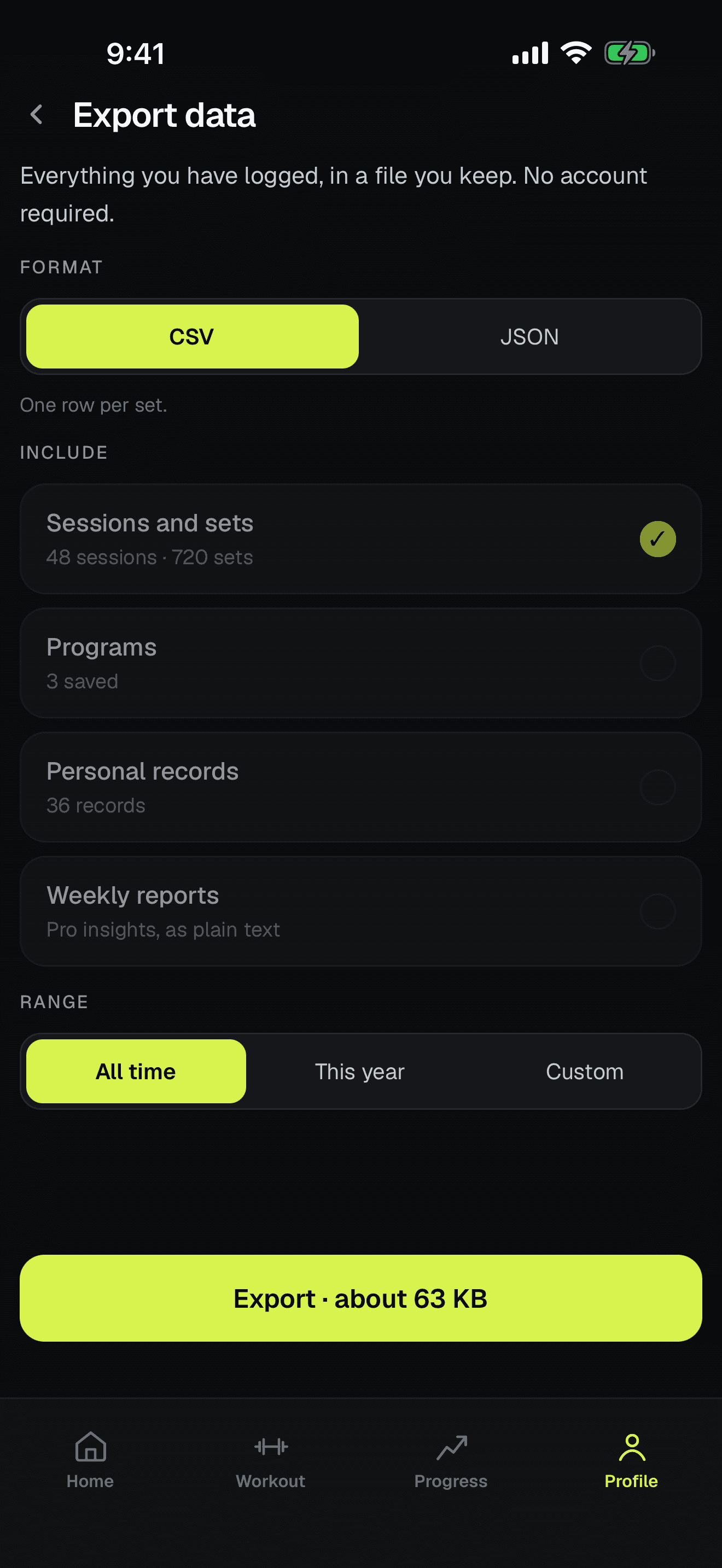
- Export you keep
- Everything you've logged as CSV, one row per set, or JSON with sessions, programs, records and reports. No account required to take it.
- Apple Health, narrowly
- Optional. We write your finished workouts and read your body weight to size bodyweight volume. Never your heart rate, never your step count, never another app's workouts.
- No ads, on either tier
- Free is free because Pro pays for it, not because you're the product.